
Registration Guide for Prospective Members
Welcome! If you are looking to sign up for a youth sports program using TeamSnap ONE this guide will walk you through the entire registration process from start to finish.
Begin Your Registration
To get started, you’ll need to access the registration form provided by the sports organization you want to register with.
- Get the registration link from the organization. The organization will typically send the registration link by email, or you may find it on the organization’s public website or social media profiles. TeamSnap does not provide registration links directly.
- Open the registration link to begin the registration process. You’ll be asked to sign in if you already have a TeamSnap account, or to create an account if you’re new to TeamSnap.
Important: You must be 18 years of age or older to complete a registration.

Select a Participant
After signing in, select the participant you want to register.
- Select an Existing Participant: Choose a participant already associated with your account. The registration form will indicate which participants are eligible for the program based on its requirements. For example, if a program is for ages 8–10, a 15-year-old participant will be marked as ineligible.
- Add a New Participant: If the participant isn’t already associated with your account, select the Add new participant button to add them. You’ll be prompted to enter their information, including:
- First name
- Last name
- Gender
- Date of birth

3. National Governing Body Verification (Optional)
If the organization is affiliated with a national governing body (NGB) like Hockey Canada, USA Hockey, or USA Lacrosse, you may be asked to verify your player's data with the NGB to ensure compliance.
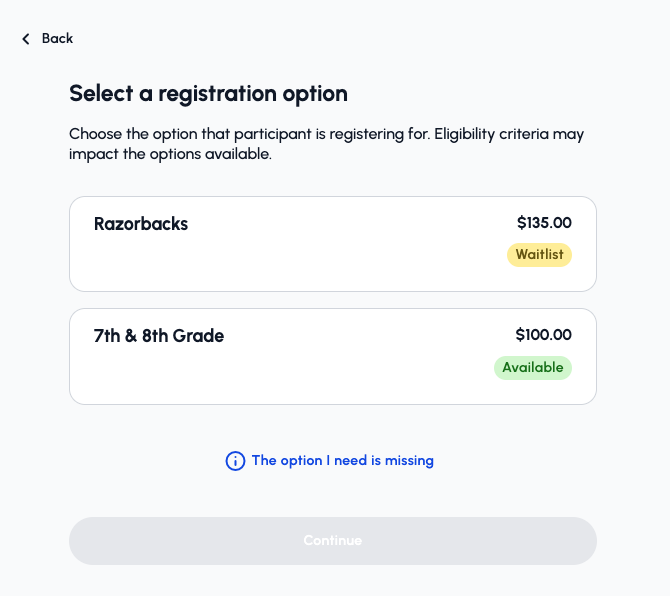
4. Choose a Registration Option
Next, you will be presented with the program options:
- Select a registration option: You will be asked to choose a registration option. Organizations typically offer several options based on age groups, gender groups, or price levels.
- Don't see the option you're looking for: Eligible registration options are displayed based on the information entered for the selected participant.
- If the desired option is not listed, please verify:
- Correct participant is selected.
- Participant's birthdate and gender selections are accurate.
- If the desired option is still missing, please contact your organization administrator for further assistance.
- If the desired option is not listed, please verify:
5. Additional Questions, Waivers and Add-ons (optional)
The following steps are optional and depend on the data required by the organization:
- Additional Questions: The organization may ask for additional information about you or the participant, such as contact information or other details needed for the registration.
- Additional Contacts: You may have the option to add another contact for the participant, such as a family member or other authorized contact.
- Agreements and Waivers: If the organization requires you to accept agreements or waivers, you’ll be prompted to review and agree to them during registration.
- Add-Ons: If the form includes optional products or services, like registration insurance, you may see the option to add them to your registration.
Important: You must be at least 13 years of age to be added as a player contact.
6. Waitlist
If the program has reached full capacity, you will be given the option to join the waitlist or remove your registration. If you join the waitlist, you will be notified if a spot opens up later.

7. Checkout and Confirmation
If the program is not at capacity, you will proceed to the checkout page:
- Registration Details: The checkout page displays the full details of your registration, including:
- The program(s) you signed up for.
- The participant(s) you signed up.
- The total price.
- Add More Registrations: You have the option to add another registration for the same participant, or to add a registration for another participant.
- Choose Payment: Select your desired payment method. Depending on the organization, available payment methods may differ. Also, if the organization offers payment plans, you will be able to select that option here.
- Confirm: Once payment is processed, you will see a confirmation screen and receive an email confirmation of your successful registration.